
Sound, not screen
A Philips Hue Sync Box is HDMI hardware for matching lights to the picture on your TV. HueCommand (Command for Philips Hue on the App Store) does something different: it reacts to sound picked up by your device's microphone, and it runs animated effects. For music, parties and atmosphere you only need your Hue Bridge.
HueCommand does not sync lights to video or screen content.
Music Reactive (free)
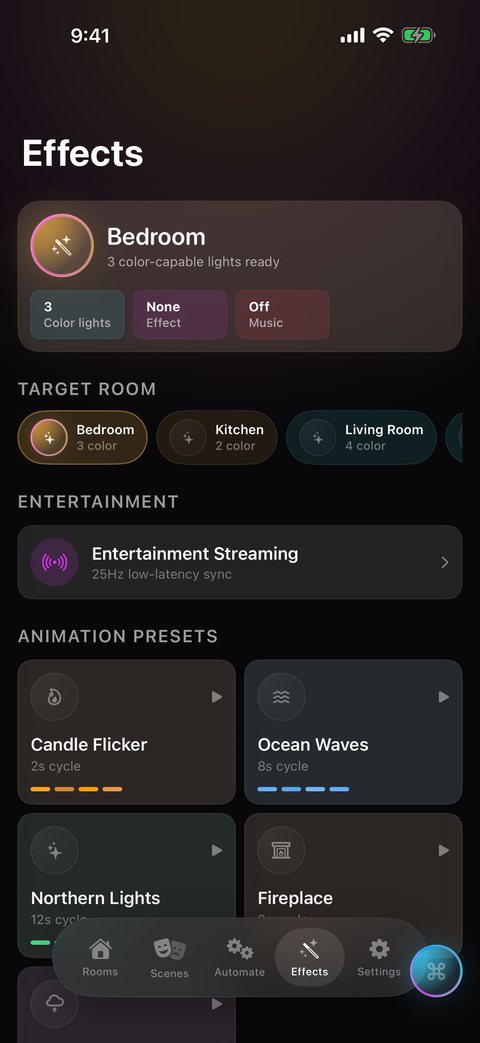
Choose a room in the Effects tab and turn on Music Reactive. The app splits incoming sound into bass, mids and highs and maps them to the colors of your lights, so beats and changes in the music show up in the room.
- Every color light in the room you pick reacts
- A sensitivity slider (0.5 to 3.0) adjusts it for quiet or loud rooms
- On iPhone you can keep playing music from the same phone while it listens
- Audio is analysed on your device. Nothing is recorded, stored or uploaded
Music Reactive only runs while the app is open. It stops when the app goes to the background. More about music sync.
Entertainment Streaming (Pro)
For faster, tighter sync, HueCommand can use the Hue Entertainment API. It streams color to an Entertainment area up to 25 times a second over an encrypted DTLS connection, with a live five-band display from bass to treble. Each of up to five lights in the area follows one frequency band.
- Create an Entertainment area in the official Philips Hue app first. HueCommand lists your areas and streams to them
- You must be home, on the same network as the Bridge. Streaming doesn't go through remote access
- If the app says the entertainment client key is missing, pair your Bridge again to generate one
Candle, fireplace and other effects
The Effects tab also has five animated presets for color lights: Candle Flicker, Fireplace, Ocean Waves, Northern Lights and Thunderstorm.
- Stays on: Candle Flicker and Fireplace use effects built into Hue lights. When every color light in the room supports them, they run on the Bridge and keep glowing after you close the app
- Live: the others are animated from your device while the app is open. Tap Keep it on to save one as a scene that stays on
Effects have no speed or intensity controls. See all light effects.
Devices
Music Reactive and Entertainment Streaming need a microphone, so they work on iPhone, iPad, Mac and Apple Vision Pro. Apple TV has no microphone, so they are not in the tvOS app, although effects are.
Free vs Pro
Music Reactive and effects are free. Entertainment Streaming requires Pro, which is $2.99 a month or $19.99 a year (US prices, which can vary by country), or a one-time Lifetime unlock. See Free vs Pro.
Frequently asked questions
Can I sync Philips Hue lights to music without a Sync Box?
Yes. HueCommand's free Music Reactive mode listens through your device's microphone and changes your Hue lights to match the music. You only need a Hue Bridge and color lights.
Can HueCommand sync my lights to my TV picture?
No. HueCommand reacts to sound, not video. It does not capture or analyse what is on screen.
What is the difference between Music Reactive and Entertainment Streaming?
Music Reactive is free and works with every color light in a room. Entertainment Streaming requires Pro, streams up to 25 updates a second through the Hue Entertainment API, works only on your home network, and needs an Entertainment area set up in the official Hue app.
Do candle and fireplace effects need the app to stay open?
Usually not. Candle Flicker and Fireplace run on the Hue Bridge when every color light in the room supports them, so they keep going after you close the app. Other effects need the app open unless you save them with Keep it on.
Is my microphone audio recorded?
No. Audio is analysed on your device to work out light colors. It is not recorded, stored or sent anywhere.