
Why foldables need their own layout
Apps designed for a single flat screen often look wrong on a foldable. Buttons end up on the fold, text gets cut off on the narrower outer display, and custom tab bars stay at the bottom when the system has moved its own bars to the side. HueCommand (Command for Philips Hue on the App Store) has been adjusted for iPhone Duo so the light controls stay easy to reach in each position.
Room tiles never sit on the fold
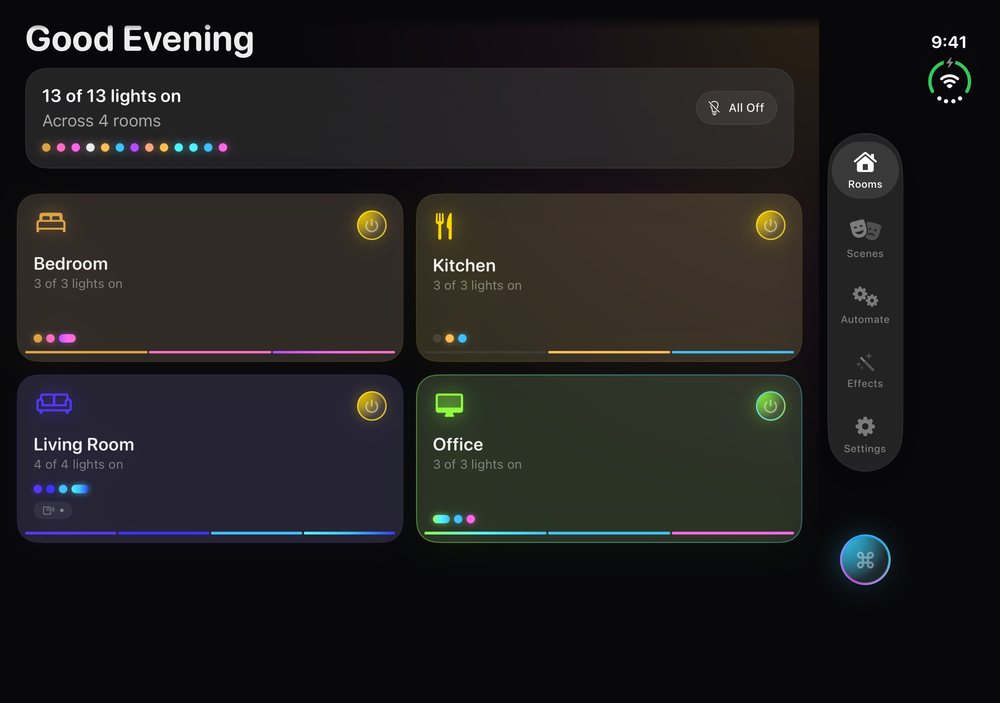
When the app is open across the unfolded inner display, the Rooms grid checks whether it spans the fold. If it does, it uses an even number of columns, so the fold falls between two columns and never across a room tile. You can tap any room without aiming at the fold.
Unfolded, the grid adds columns to fill the extra width, so you can see more rooms at once. If an odd number of columns would fit, it drops one so the fold still falls between tiles.
Tab bar on the side
On iOS 27.1 and later, iOS puts app bars along a side edge on iPhone Duo in most positions. SwiftUI moves its standard bars automatically, but HueCommand uses its own tab bar, so it has been built to follow. When iOS puts bars on the leading or trailing edge, the Rooms, Scenes, Automate, Effects and Settings tabs move into a column on that side, and your content is laid out beside the bar instead of underneath it.
Layouts that fit the outer display
The outer display is narrower, and with the side tab bar that leaves little room. Screens across the app have been adjusted to fit:
- Settings and Automate cards stack their title and details instead of cutting them off
- Accessory rows (switches and sensors) move the battery level below the name when the row is narrow
- Long single-word names shrink to fit instead of being hyphenated mid-word
- Scene cards stay inside their column, trimming extra color dots rather than widening the card
- The Effects room picker shares the width instead of pushing the page sideways
The same changes help on smaller iPhones and with large text sizes.
Quick switching when folded
Folded, the outer display works well for quick switching: open the app, tap a room, done. Interactive Home Screen widgets and the Control Center control (both Pro) make it faster still.
Everything else works as on iPhone
On iPhone Duo you get the full iPhone app: rooms, scenes, effects, music sync, the Goodnight fade, plus automations and widgets with Pro. Pairing with your Hue Bridge, local control and your saved scenes are the same as on any other iPhone.
The app is a free download. Pro is $2.99 a month or $19.99 a year (US prices, which can vary by country), or a one-time Lifetime unlock. See Free vs Pro.
Frequently asked questions
Does HueCommand support iPhone Duo?
Yes. The iPhone app adapts to iPhone Duo. Room tiles avoid the fold, the tab bar follows iOS to the side edge, and screens are adjusted to fit the outer display.
Why is there always an even number of room columns when unfolded?
An even number of columns puts the fold between two columns, so no room tile sits on the fold.
Which iOS version do I need for the side tab bar?
The side tab bar and fold detection follow iOS's own bar placement, which needs iOS 27.1 or later. On earlier versions the tab bar stays at the bottom.
Is there a separate iPhone Duo app?
No. It's the same free iPhone app from the App Store, and it adapts to the device automatically.
Do widgets work on iPhone Duo?
Yes. Home Screen widgets and the Control Center control work as they do on any iPhone running a supported iOS version. Both require Pro.