
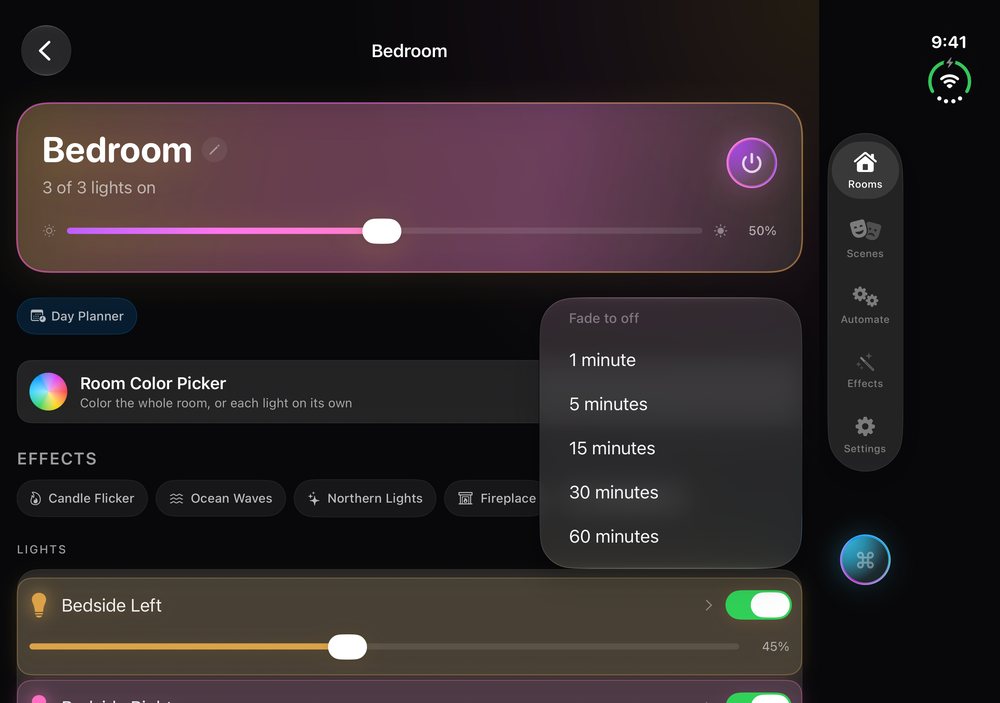
A sleep timer for your Hue lights
Switching the lights off can leave you in sudden darkness, and leaving them on all night wastes energy. Goodnight in HueCommand (Command for Philips Hue on the App Store) sits between the two: it lowers a whole room's lights gradually until they are off. You can read for a few more minutes, or fall asleep while the room gets darker.
How to start a Goodnight fade
- Open the room you want to fade. The Goodnight button appears when at least one light in the room is on.
- Tap Goodnight and pick a duration under Fade to off: 1, 5, 15, 30 or 60 minutes.
- A message confirms the fade has started. You can now close the app and lock your phone.
Why it keeps going after you close the app
Goodnight sends your Hue Bridge one command: turn the room off, with a long transition time. The Bridge does the fading. Your phone doesn't need to stay awake, stay on Wi-Fi or even stay switched on once the command is sent.
Which duration to choose
- 1 minute: a gentle alternative to a hard switch-off, for example when you leave a room
- 5 minutes: time to get into bed
- 15 to 30 minutes: for reading or a bedtime story
- 60 minutes: the slowest fade, for falling asleep in a slowly darkening room
For a softer start, choose a warm, dim scene before you start the fade. Circadian lighting can also warm your lights through the evening, and the Day Planner (Pro) changes them at set times.
Troubleshooting
- No Goodnight button? It only appears when at least one light in the room is on. Turn a light on first.
- The fade stopped early? If a switch, another app or an automation sends those lights a new command, start Goodnight again.
- Nothing happened? Your device needs to reach the Bridge for the moment it takes to send the command, either on your home network or, with Pro, through remote access.
Where Goodnight works
Goodnight is in the room screen on iPhone, iPad, Mac, Apple TV and Apple Vision Pro. On Apple TV you can start it with the Siri Remote at the end of a film. It is not in the Apple Watch app.
Goodnight is free. It does not need Pro, an account or an internet connection, only your Hue Bridge on the local network. See Free vs Pro for what Pro adds.
Frequently asked questions
Can Philips Hue lights fade off slowly at bedtime?
Yes. In HueCommand, open a room and tap Goodnight. Choose 1, 5, 15, 30 or 60 minutes and the room dims gradually until the lights are off.
Does the fade stop if I lock my phone or close the app?
No. Goodnight sends one command with a long transition to your Hue Bridge, and the Bridge does the fading. Your phone can be locked, the app closed, or the phone switched off.
Can I pick any duration I like?
Goodnight offers five durations: 1, 5, 15, 30 and 60 minutes.
Is Goodnight a Pro feature?
No. Goodnight is free on iPhone, iPad, Mac, Apple TV and Apple Vision Pro.
Can I fade more than one room?
Goodnight works one room at a time. Start it in each room you want to fade.