
Why a Mac app for Hue lights?
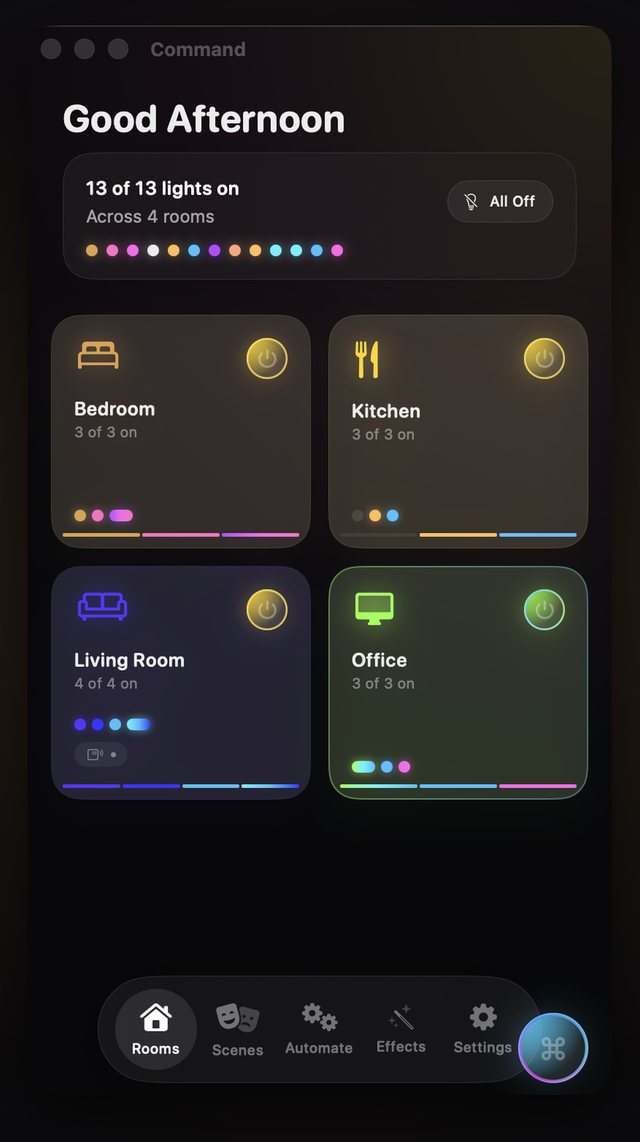
If you spend the day at a Mac, reaching for your phone to dim the office lights breaks your flow. HueCommand (listed on the App Store as Command for Philips Hue) runs as a native macOS app, so your rooms, scenes and effects sit in a window next to your other work.
It is built with SwiftUI for macOS. It has its own Dock icon, a resizable window, and the menus and shortcuts you expect from a Mac app.
Keyboard shortcuts and menu commands
The tabs and the refresh command are in the menu bar at the top of the screen, each with a keyboard shortcut:
- ⌘1 Rooms, ⌘2 Scenes, ⌘3 Automate, ⌘4 Effects, ⌘5 Settings
- ⌘R refreshes every connected Hue Bridge
- Esc closes an open sheet
- Right-click a room to turn it on or off, rename it, or rearrange your rooms
All On and All Off on the Rooms tab switch the whole house at once.
What you can do on Mac
- Lights and rooms: on/off, brightness, color and color temperature, with a color wheel for color lights
- Scenes: activate the scenes saved on your Bridge, or build your own
- Effects: Candle Flicker, Fireplace, Ocean Waves, Northern Lights and Thunderstorm
- Music Reactive: lights follow audio picked up by your Mac's microphone, analysed on the Mac (how it works)
- Goodnight: fade a room to off over 1, 5, 15, 30 or 60 minutes (details)
- Remote access (Pro): control your home lights from a Mac that is somewhere else (details)
AI Scene Creator (Pro) uses Apple's on-device model, so it needs a Mac that supports Apple Intelligence, running macOS 26 or later.
Setup and requirements
- A Mac running macOS 14 Sonoma or later
- A Philips Hue Bridge on the same network
On first launch the app looks for your Bridge, then asks you to press the link button on it to pair. If you don't have a Bridge yet, demo mode lets you explore the app with sample rooms first.
Commands go straight to the Bridge on your local network. The Philips Hue cloud is only used if you turn on remote access.
Free vs Pro
The app is a free download, and light and room control, scenes, effects, music sync and Goodnight are free. Pro adds features such as remote access, multiple Bridges, Bridge Backup, Entertainment Streaming and AI Scene Creator. Pro is $2.99 a month or $19.99 a year (US prices, which can vary by country), or a one-time Lifetime unlock. See Free vs Pro.
Frequently asked questions
Is there a native Philips Hue app for Mac?
Yes. HueCommand, listed on the App Store as Command for Philips Hue, has a native macOS version for macOS 14 or later, with a resizable window, a Dock icon, menu commands and keyboard shortcuts.
Does the Mac app have a menu bar icon?
No. The Mac app is a standard window app. Use Command-1 to Command-5 to switch tabs and Command-R to refresh.
Do I need to buy the app separately for Mac?
No. The Mac, iPhone, iPad, Apple TV and Apple Vision Pro versions are one App Store listing. The download is free on each device, and you can restore a Pro purchase made with the same Apple Account.
Can I control my Hue lights from my Mac when I'm not at home?
Yes, with Pro. Sign in to your Philips Hue account under Settings, Remote Access, and the app can reach your Bridge through the Philips Hue cloud.
Does music sync work on Mac?
Yes. Music Reactive listens through your Mac's microphone, analyses the audio on the Mac and changes your lights to match. It is free.