
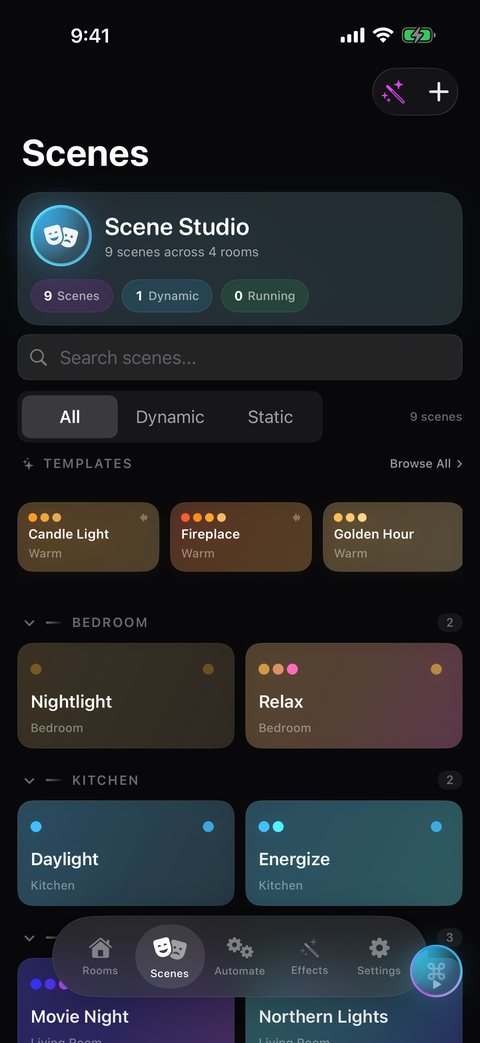
What the AI Scene Creator does
Picking a color for every light in a room takes time. The AI Scene Creator lets you skip that. You write a few words, such as "warm sunset glow" or "deep ocean blues", and HueCommand asks Apple's on-device language model to come up with a scene for the room you picked.
Each result includes:
- A scene name of a few words, so it is easy to find later.
- A set of colors, one per light in the room. If there are more lights than colors, the colors repeat across the lights.
- A brightness level from 0 to 100 percent.
- Static or dynamic. The model can mark a scene as dynamic, meaning it should slowly move between its colors, and choose a speed.
White-only bulbs in the room cannot show color, so they get the brightness level only.
Try it first, then save it
After a scene is generated you get two buttons:
- Apply sends the colors and brightness straight to the lights in the room, so you can see how it looks. Nothing is saved yet.
- Save creates the scene on your Hue Bridge. A static result is saved as a normal scene; a dynamic result is saved as a dynamic scene with its color palette and speed. You will see "Scene saved to bridge" when it is done.
Because the saved scene lives on the bridge, it shows up with your other scenes in HueCommand. If you do not like a result, change the wording and generate again.
How to create a scene with AI
- Open HueCommand and go to the Scenes tab.
- Tap the wand button at the top of the screen to open the AI Scene Creator.
- Choose the room the scene is for.
- Type a description, or tap one of the suggestions such as "Cozy fireplace evening", "Northern lights" or "Rainy day reading".
- Tap Generate Scene and wait for the result.
- Tap Apply to preview it on your lights, then tap Save to store it on your Hue Bridge.
Runs on your device
Scene generation uses Apple's Foundation Models framework, which runs the language model on your device. HueCommand does not send your description to an outside AI service, and there is no separate AI subscription to pay for.
Requirements
- A device that supports Apple Intelligence, running iOS 26, iPadOS 26, macOS 26 or visionOS 26 or later, with Apple Intelligence available.
- HueCommand Pro. The AI Scene Creator is a Pro feature ($2.99 a month or $19.99 a year in the US, or a one-time Lifetime unlock; prices vary by country).
- A Philips Hue Bridge and at least one light in the room you choose.
The AI Scene Creator is not available on Apple TV. HueCommand is listed on the App Store as Command for Philips Hue.
Frequently asked questions
Why don't I see the wand button on the Scenes screen?
HueCommand only shows the AI Scene Creator button when Apple's on-device model is available. You need a device that supports Apple Intelligence, running iOS 26, iPadOS 26, macOS 26 or visionOS 26 or later, with Apple Intelligence available on that device.
Is the AI Scene Creator free?
No, it requires Pro. Free users who tap the button see the Pro upgrade screen. Regular scene creation and scene control stay free.
Does my description leave my device?
The scene is generated with Apple's on-device Foundation Models framework. HueCommand does not send your text to a third-party AI service.
What happens with white-only bulbs?
They cannot show color, so the AI scene sets only their brightness. Color bulbs get the generated colors.
Can I edit an AI scene after saving it?
It is saved to your Hue Bridge like any other scene, so it appears in your scene list. If you want a different look, the quickest route is to adjust your description and generate a new one.